> ## Documentation Index
> Fetch the complete documentation index at: https://docs.gidr.ai/llms.txt
> Use this file to discover all available pages before exploring further.
# Manage Nodes
> Understand and use different nodes in AI Studio workflows.
Nodes are the building blocks of your AI workflows. Each node performs a specific function, such as processing input, retrieving knowledge, or making decisions.
## Accessing Nodes
The **Nodes** panel is located on the right side of the AI Studio interface, below the Workflows list.
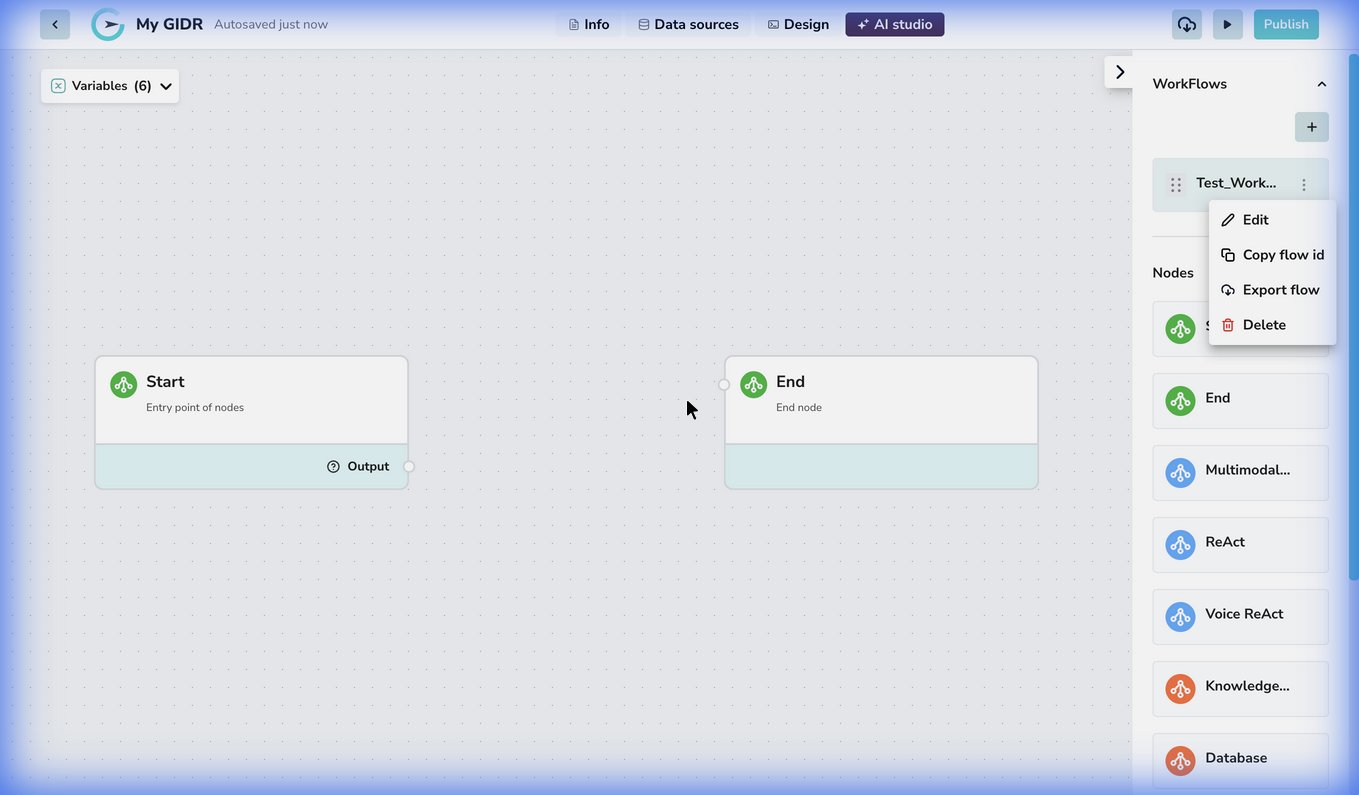 To use a node, simply drag and drop it from the panel onto the canvas.
## Available Nodes
### Logic Nodes
| Node Type | Description |
| :----------------- | :------------------------------------------------------------------------------------------------------ |
| **Start** | The entry point of your workflow. Every workflow must have a Start node. |
| **End** | The final step in your workflow. Returns the final output. |
| **If/Else Router** | Creates conditional branching to split your workflow into different paths based on specific conditions. |
### AI & Reasoning Nodes
| Node Type | Description |
| :-------------- | :--------------------------------------------------------------------------------- |
| **ReAct** | Implements "Reasoning + Acting" logic, allowing the AI to think and perform tasks. |
| **Voice ReAct** | Specialized ReAct node optimized for voice-based interactions and processing. |
### Data & Content Nodes
| Node Type | Description |
| :---------------------- | :--------------------------------------------------------------------------------------------- |
| **Multimodal Content** | Handles various content types (text, image, audio) for input/output processing using LLMs. |
| **Knowledge Retrieval** | Retrieves information from your GIDR's knowledge base (files, URLs, etc.) via semantic search. |
| **Database** | Executes SQL queries on connected databases to retrieve or store structured data. |
| **REST API** | Connects to external services and APIs using HTTP requests. |
| **REPL** | Executes custom Python code directly within your workflow. |
| **Markdown** | Renders and processes markdown-formatted content. |
## Configuring Nodes
Click on any node in the canvas to open its configuration panel. The available settings depend on the node type:
* **Inputs/Outputs**: Define what data flows into and out of the node.
* **Parameters**: specific settings for the node's behavior (e.g., model selection, prompt templates).
## Data Flow Between Nodes
Nodes communicate by passing data through connections. Each node can produce **outputs** that become available as **inputs** to downstream nodes.
### How It Works
1. **Outputs**: When a node executes, it produces one or more output variables. For example, a Knowledge node produces `documents`, `texts`, and `images` outputs.
2. **Connections**: Draw a line from a source node's output handle to a destination node's input handle to establish a data flow.
3. **Variable Selection**: In the destination node's configuration, use the **Input variable selector** to choose:
* **Comparison Type**: Select "Node" to reference another node's output.
* **Node**: Choose which upstream node to pull data from.
* **Output Variable**: Select which specific output to use (e.g., `documents` vs `texts`).
### Common Patterns
| Pattern | Description |
| :---------------------------------- | :------------------------------------------------------------------------------------------------------------------------- |
| **Knowledge → Multimodal** | Retrieve context, then pass it to an LLM for reasoning. Select `texts` for simple prompts or `documents` for full context. |
| **Start → Router → Multiple Paths** | Branch logic based on user input or conditions. |
The **ReAct node** has built-in retrieval capabilities configured as tools within the node itself, so it typically doesn't require a separate Knowledge node upstream.
Each node type has different output options. See the individual node documentation pages for details on what outputs each node provides.
To use a node, simply drag and drop it from the panel onto the canvas.
## Available Nodes
### Logic Nodes
| Node Type | Description |
| :----------------- | :------------------------------------------------------------------------------------------------------ |
| **Start** | The entry point of your workflow. Every workflow must have a Start node. |
| **End** | The final step in your workflow. Returns the final output. |
| **If/Else Router** | Creates conditional branching to split your workflow into different paths based on specific conditions. |
### AI & Reasoning Nodes
| Node Type | Description |
| :-------------- | :--------------------------------------------------------------------------------- |
| **ReAct** | Implements "Reasoning + Acting" logic, allowing the AI to think and perform tasks. |
| **Voice ReAct** | Specialized ReAct node optimized for voice-based interactions and processing. |
### Data & Content Nodes
| Node Type | Description |
| :---------------------- | :--------------------------------------------------------------------------------------------- |
| **Multimodal Content** | Handles various content types (text, image, audio) for input/output processing using LLMs. |
| **Knowledge Retrieval** | Retrieves information from your GIDR's knowledge base (files, URLs, etc.) via semantic search. |
| **Database** | Executes SQL queries on connected databases to retrieve or store structured data. |
| **REST API** | Connects to external services and APIs using HTTP requests. |
| **REPL** | Executes custom Python code directly within your workflow. |
| **Markdown** | Renders and processes markdown-formatted content. |
## Configuring Nodes
Click on any node in the canvas to open its configuration panel. The available settings depend on the node type:
* **Inputs/Outputs**: Define what data flows into and out of the node.
* **Parameters**: specific settings for the node's behavior (e.g., model selection, prompt templates).
## Data Flow Between Nodes
Nodes communicate by passing data through connections. Each node can produce **outputs** that become available as **inputs** to downstream nodes.
### How It Works
1. **Outputs**: When a node executes, it produces one or more output variables. For example, a Knowledge node produces `documents`, `texts`, and `images` outputs.
2. **Connections**: Draw a line from a source node's output handle to a destination node's input handle to establish a data flow.
3. **Variable Selection**: In the destination node's configuration, use the **Input variable selector** to choose:
* **Comparison Type**: Select "Node" to reference another node's output.
* **Node**: Choose which upstream node to pull data from.
* **Output Variable**: Select which specific output to use (e.g., `documents` vs `texts`).
### Common Patterns
| Pattern | Description |
| :---------------------------------- | :------------------------------------------------------------------------------------------------------------------------- |
| **Knowledge → Multimodal** | Retrieve context, then pass it to an LLM for reasoning. Select `texts` for simple prompts or `documents` for full context. |
| **Start → Router → Multiple Paths** | Branch logic based on user input or conditions. |
The **ReAct node** has built-in retrieval capabilities configured as tools within the node itself, so it typically doesn't require a separate Knowledge node upstream.
Each node type has different output options. See the individual node documentation pages for details on what outputs each node provides.