> ## Documentation Index
> Fetch the complete documentation index at: https://docs.gidr.ai/llms.txt
> Use this file to discover all available pages before exploring further.
# REPL Node
> Execute Python code directly within your workflow.
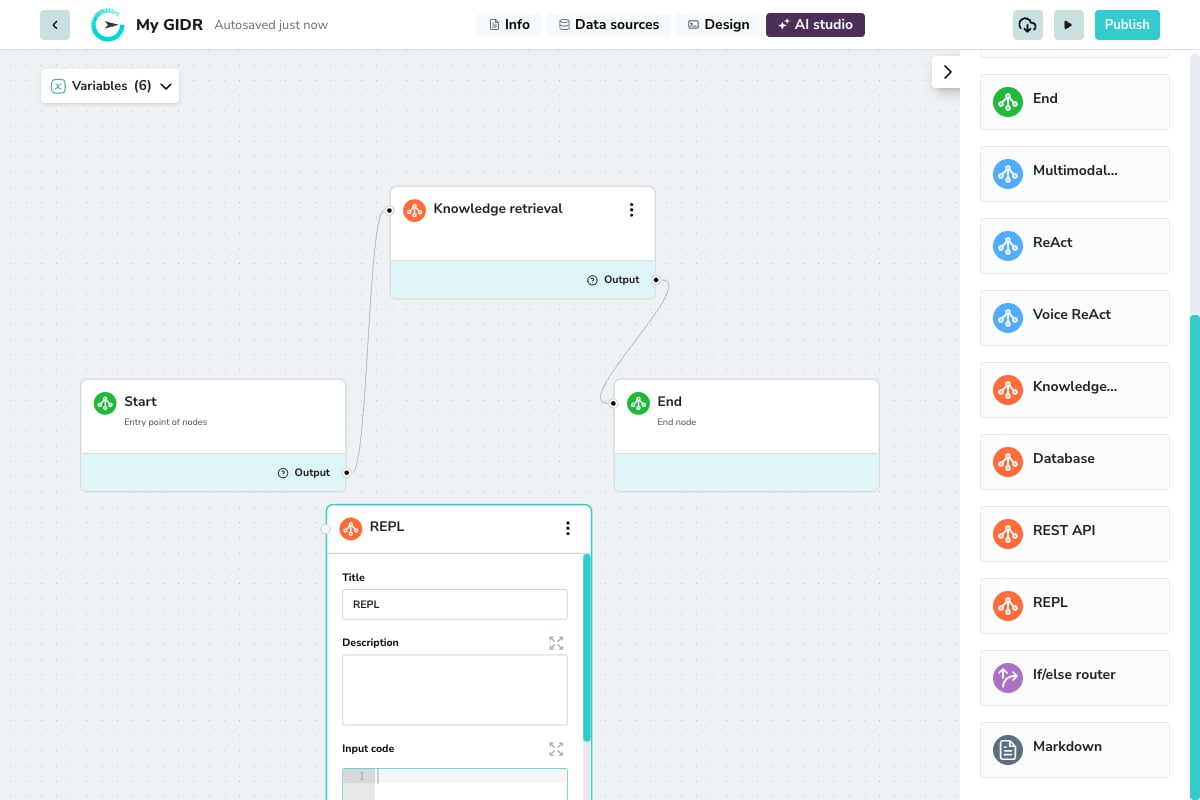
The **REPL** (Read-Eval-Print Loop) node allows you to run custom code snippets as part of your AI workflow. This is powerful for data transformations, calculations, or custom logic not covered by standard nodes.
 ## Overview
Use the REPL node when you need to:
* Transform or format data between nodes
* Perform mathematical calculations
* Parse or manipulate strings
* Implement custom business logic
* Process API responses into structured formats
## Configuration
## Overview
Use the REPL node when you need to:
* Transform or format data between nodes
* Perform mathematical calculations
* Parse or manipulate strings
* Implement custom business logic
* Process API responses into structured formats
## Configuration
 ### Basic Settings
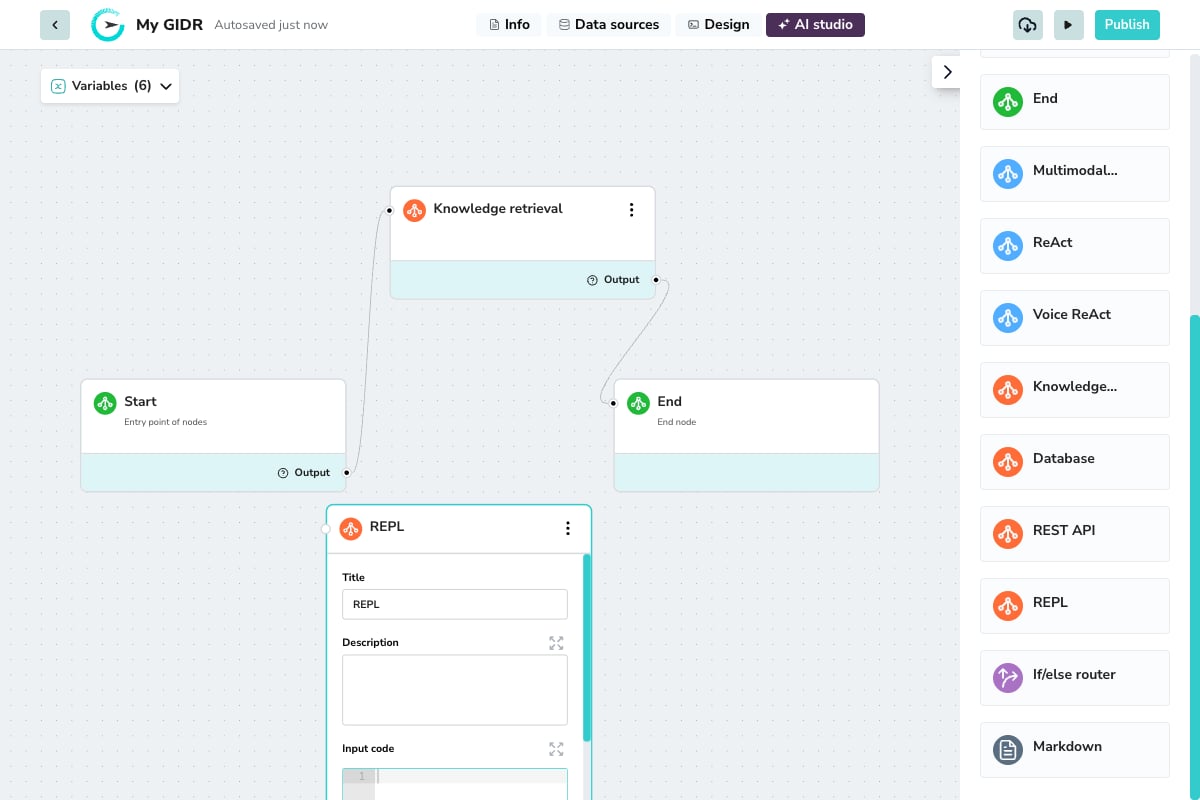
* **Title**: A descriptive name for the node (e.g., "Calculate Total", "Format Response").
* **Description**: Document what your code does for future reference.
## Runtime Environment
The REPL node runs in a secure, sandboxed environment. Below are the supported functions, libraries, and specific limitations.
### Core Requirements
* **Mandatory Main Function**: Your code must include a `def main():` function.
* **Guarded Iteration**: `for` and `while` loops are supported but monitored to prevent infinite execution.
### Input Code
The code editor is where you write your Python script. Your code has access to:
* **Workflow variables**: Use `{{variable_name}}` syntax to access variables from previous nodes.
* **Built-in functions**: Standard Python libraries for data processing.
### Input & Output
* **Input variable selector**: Map specific variables from previous nodes to use in your code.
* **Output**: The node passes the result of your code execution to downstream nodes via the Output handle.
**Example**: Parse a JSON response and extract specific fields:
```python theme={null}
import json
data = json.loads({{api_response}})
result = data.get('items', [])[:5] # Get first 5 items
```
### Built-in Functions
You can use standard Python built-ins for data manipulation:
* **Collection Helpers**: `list`, `dict`, `tuple`, `set`, `enumerate`, `reversed`
* **Math & Logic**: `max`, `min`, `sum`, `abs`, `all`, `any`
* **Utilities**: `type`
### Supported Libraries
The following standard libraries are pre-installed and safe to import:
* **Data & Formats**: `json`, `xml`, `base64`, `pandas`
* **Networking**: `requests`
* **Time & Dates**: `datetime`, `time`
* **Utilities**: `re` (Regex), `hashlib`, `hmac`, `secrets`, `typing`
* **Database**: `sqlalchemy`, `sqlalchemy.orm`, `psycopg2`
### GCS Helper Functions
Use the built-in Google Cloud Storage (GCS) helper functions to read, write, list, and delete files in the storage bucket for the current GIDR. They are injected into the sandbox at runtime, so no imports are required.
Each GIDR has its own isolated Google Cloud Storage bucket. Paths are relative to that GIDR's root (`gidr/files/{gidr_id}/`), and you can write files to subfolders, such as `reports/2026/july.csv`.
Files written by one GIDR cannot be accessed by another GIDR. Path traversal, such as `../other-gidr/file.txt`, is blocked.
#### `gidr_write_gcs`
Upload content to a file in GCS. Creates the file if it does not exist and overwrites it if it does.
```python theme={null}
gidr_write_gcs(path, content, content_type='application/octet-stream')
```
| Parameter | Type | Required | Description |
| -------------- | ---------------- | -------- | ---------------------------------------------------------------------------------------------------------------------- |
| `path` | `str` | Yes | File path relative to the GIDR root, such as `reports/july.csv`. |
| `content` | `str` or `bytes` | Yes | File content to upload. |
| `content_type` | `str` | No | MIME type. Defaults to `application/octet-stream`; use values such as `text/plain`, `text/csv`, or `application/json`. |
**Returns:** `{"status": 200, "path": "reports/july.csv"}`
**Raises:** `ValueError` for an empty or invalid path; `RuntimeError` if the GCS upload fails.
```python theme={null}
def main():
result = gidr_write_gcs(
'reports/july.csv',
'date,value\n2026-07-01,100',
content_type='text/csv'
)
return result
```
#### `gidr_read_gcs`
Download the content of a file from GCS.
```python theme={null}
gidr_read_gcs(path)
```
| Parameter | Type | Required | Description |
| --------- | ----- | -------- | ------------------------------------ |
| `path` | `str` | Yes | File path relative to the GIDR root. |
**Returns:** The file content as a string.
**Raises:** `ValueError` for an empty or invalid path; `RuntimeError` (404) if the file does not exist.
```python theme={null}
def main():
content = gidr_read_gcs('reports/july.csv')
return content
```
#### `gidr_delete_gcs`
Delete a file from GCS.
```python theme={null}
gidr_delete_gcs(path)
```
| Parameter | Type | Required | Description |
| --------- | ----- | -------- | ------------------------------------ |
| `path` | `str` | Yes | File path relative to the GIDR root. |
**Returns:** `{"status": 204, "path": "reports/july.csv"}`
**Raises:** `ValueError` for an empty or invalid path; `RuntimeError` if the GCS deletion fails.
```python theme={null}
def main():
result = gidr_delete_gcs('reports/july.csv')
return result
```
#### `gidr_list_gcs`
List all files under a path. By default, this lists every file in the GIDR root folder.
```python theme={null}
gidr_list_gcs(path='', max_results=1000)
```
| Parameter | Type | Required | Description |
| ------------- | ----- | -------- | --------------------------------------------------------------------------------- |
| `path` | `str` | No | Subfolder to list, such as `reports/`. Defaults to the GIDR root. |
| `max_results` | `int` | No | Maximum files to return. Defaults to `1000`; results are paginated automatically. |
**Returns:** A list of file paths relative to the GIDR root.
```python theme={null}
# List all files
def main():
return gidr_list_gcs()
```
```python theme={null}
# List only files in a subfolder
def main():
return gidr_list_gcs('reports/')
```
Combine `gidr_list_gcs` with `gidr_read_gcs` to process multiple files.
```python theme={null}
def main():
files = gidr_list_gcs('reports/')
results = {}
for file_path in files:
results[file_path] = gidr_read_gcs(file_path)
return results
```
### Database (DB) Utility Functions
Use these built-in functions to access the GIDR's database instance and create tables. Connection details are injected at runtime, so no database configuration is required.
| Function | Signature | Returns |
| -------------- | ----------------------------------------------------- | ------------------------------- |
| `gidr_get_db` | `gidr_get_db() -> Generator[Session, None, None]` | SQLAlchemy `Session` generator. |
| `create_table` | `create_table(table_name, columns, primary_key=None)` | `None` |
#### `gidr_get_db`
Yields a SQLAlchemy `Session` connected to the GIDR's database instance. The session is closed automatically when its generator is exhausted.
Always call `db_gen.close()` in a `finally` block to return the connection to the pool. Do not call `session.close()` directly; let the generator handle teardown.
The session uses `autocommit=False`, so call `session.commit()` explicitly after writes. SQLAlchemy's `text()` is pre-imported in the global scope and does not need to be imported.
**Example: Read rows**
```python theme={null}
import datetime
def _json_safe(value):
if value is None or isinstance(value, (str, int, float, bool)):
return value
if isinstance(value, (datetime.date, datetime.datetime)):
return value.isoformat()
if isinstance(value, bytes):
return value.decode("utf-8", errors="replace")
return str(value)
def main():
db_gen = gidr_get_db()
session = next(db_gen)
try:
rows = session.execute(
text('SELECT * FROM "Sample_database_file" LIMIT 10')
).fetchall()
return {
"orders": [
{key: _json_safe(value) for key, value in row._mapping.items()}
for row in rows
]
}
finally:
db_gen.close()
```
**Example: Insert a row**
```python theme={null}
def main():
product_name = global_variables.get("product_name")
price = global_variables.get("price")
db_gen = gidr_get_db()
session = next(db_gen)
try:
session.execute(
text("INSERT INTO products (name, price) VALUES (:name, :price)"),
{"name": product_name, "price": price}
)
session.commit()
finally:
db_gen.close()
return {"status": "inserted"}
```
#### `create_table`
Creates a table in the GIDR's database instance and registers it with the SQL Agent so it can be queried in later workflow steps.
Every table receives an auto-generated `row_id BIGINT` identity column. You do not need to define it.
```python theme={null}
create_table(table_name, columns, primary_key=None)
```
| Parameter | Type | Required | Description |
| ------------- | ---------------- | -------- | --------------------------------------- |
| `table_name` | `str` | Yes | Name of the new table. |
| `columns` | `dict[str, str]` | Yes | A mapping of `{column_name: sql_type}`. |
| `primary_key` | `str` | No | Column name to mark as the primary key. |
**Supported SQL types**
| Type | Use for |
| ------------ | ----------------------------- |
| `TEXT` | Strings and free text. |
| `VARCHAR(n)` | Text with a maximum length. |
| `INTEGER` | Whole numbers. |
| `BIGINT` | Large whole numbers. |
| `FLOAT` | Decimal numbers. |
| `BOOLEAN` | True or false values. |
| `DATE` | Dates in `YYYY-MM-DD` format. |
| `TIMESTAMP` | Date and time values. |
| `JSONB` | JSON objects. |
**Example: Basic table**
```python theme={null}
def main():
create_table(
"customers",
{
"name": "TEXT",
"email": "VARCHAR(255)",
"age": "INTEGER"
}
)
return {"status": "table created"}
```
**Example: Table with a primary key**
```python theme={null}
def main():
create_table(
"products",
{
"product_code": "VARCHAR(50)",
"product_name": "TEXT",
"price": "FLOAT",
"in_stock": "BOOLEAN"
},
primary_key="product_code"
)
return {"status": "ok"}
```
`create_table` creates the table through the session returned by `gidr_get_db`, commits the DDL, serializes the schema as JSON, and inserts a record into `ai_services.public.sql_agent_user_tables_map`. This lets the SQL Agent discover and query the new table in subsequent workflow steps.
* Creating a table with a name that already exists raises an error. Use a unique name or drop the existing table first.
* Column types must be valid SQL type strings, such as `TEXT`, not `string`.
* If you provide `primary_key`, that column must also appear in `columns`.
* New tables start with zero rows.
### Security Restrictions
To ensure platform stability, the following are **blocked**:
* **File System**: No file I/O operations (e.g., `open()`).
* **System Access**: No OS/system functions or arbitrary imports outside the allowlist.
Code execution has resource limits and timeouts. Avoid infinite loops and memory-intensive operations.
### Basic Settings
* **Title**: A descriptive name for the node (e.g., "Calculate Total", "Format Response").
* **Description**: Document what your code does for future reference.
## Runtime Environment
The REPL node runs in a secure, sandboxed environment. Below are the supported functions, libraries, and specific limitations.
### Core Requirements
* **Mandatory Main Function**: Your code must include a `def main():` function.
* **Guarded Iteration**: `for` and `while` loops are supported but monitored to prevent infinite execution.
### Input Code
The code editor is where you write your Python script. Your code has access to:
* **Workflow variables**: Use `{{variable_name}}` syntax to access variables from previous nodes.
* **Built-in functions**: Standard Python libraries for data processing.
### Input & Output
* **Input variable selector**: Map specific variables from previous nodes to use in your code.
* **Output**: The node passes the result of your code execution to downstream nodes via the Output handle.
**Example**: Parse a JSON response and extract specific fields:
```python theme={null}
import json
data = json.loads({{api_response}})
result = data.get('items', [])[:5] # Get first 5 items
```
### Built-in Functions
You can use standard Python built-ins for data manipulation:
* **Collection Helpers**: `list`, `dict`, `tuple`, `set`, `enumerate`, `reversed`
* **Math & Logic**: `max`, `min`, `sum`, `abs`, `all`, `any`
* **Utilities**: `type`
### Supported Libraries
The following standard libraries are pre-installed and safe to import:
* **Data & Formats**: `json`, `xml`, `base64`, `pandas`
* **Networking**: `requests`
* **Time & Dates**: `datetime`, `time`
* **Utilities**: `re` (Regex), `hashlib`, `hmac`, `secrets`, `typing`
* **Database**: `sqlalchemy`, `sqlalchemy.orm`, `psycopg2`
### GCS Helper Functions
Use the built-in Google Cloud Storage (GCS) helper functions to read, write, list, and delete files in the storage bucket for the current GIDR. They are injected into the sandbox at runtime, so no imports are required.
Each GIDR has its own isolated Google Cloud Storage bucket. Paths are relative to that GIDR's root (`gidr/files/{gidr_id}/`), and you can write files to subfolders, such as `reports/2026/july.csv`.
Files written by one GIDR cannot be accessed by another GIDR. Path traversal, such as `../other-gidr/file.txt`, is blocked.
#### `gidr_write_gcs`
Upload content to a file in GCS. Creates the file if it does not exist and overwrites it if it does.
```python theme={null}
gidr_write_gcs(path, content, content_type='application/octet-stream')
```
| Parameter | Type | Required | Description |
| -------------- | ---------------- | -------- | ---------------------------------------------------------------------------------------------------------------------- |
| `path` | `str` | Yes | File path relative to the GIDR root, such as `reports/july.csv`. |
| `content` | `str` or `bytes` | Yes | File content to upload. |
| `content_type` | `str` | No | MIME type. Defaults to `application/octet-stream`; use values such as `text/plain`, `text/csv`, or `application/json`. |
**Returns:** `{"status": 200, "path": "reports/july.csv"}`
**Raises:** `ValueError` for an empty or invalid path; `RuntimeError` if the GCS upload fails.
```python theme={null}
def main():
result = gidr_write_gcs(
'reports/july.csv',
'date,value\n2026-07-01,100',
content_type='text/csv'
)
return result
```
#### `gidr_read_gcs`
Download the content of a file from GCS.
```python theme={null}
gidr_read_gcs(path)
```
| Parameter | Type | Required | Description |
| --------- | ----- | -------- | ------------------------------------ |
| `path` | `str` | Yes | File path relative to the GIDR root. |
**Returns:** The file content as a string.
**Raises:** `ValueError` for an empty or invalid path; `RuntimeError` (404) if the file does not exist.
```python theme={null}
def main():
content = gidr_read_gcs('reports/july.csv')
return content
```
#### `gidr_delete_gcs`
Delete a file from GCS.
```python theme={null}
gidr_delete_gcs(path)
```
| Parameter | Type | Required | Description |
| --------- | ----- | -------- | ------------------------------------ |
| `path` | `str` | Yes | File path relative to the GIDR root. |
**Returns:** `{"status": 204, "path": "reports/july.csv"}`
**Raises:** `ValueError` for an empty or invalid path; `RuntimeError` if the GCS deletion fails.
```python theme={null}
def main():
result = gidr_delete_gcs('reports/july.csv')
return result
```
#### `gidr_list_gcs`
List all files under a path. By default, this lists every file in the GIDR root folder.
```python theme={null}
gidr_list_gcs(path='', max_results=1000)
```
| Parameter | Type | Required | Description |
| ------------- | ----- | -------- | --------------------------------------------------------------------------------- |
| `path` | `str` | No | Subfolder to list, such as `reports/`. Defaults to the GIDR root. |
| `max_results` | `int` | No | Maximum files to return. Defaults to `1000`; results are paginated automatically. |
**Returns:** A list of file paths relative to the GIDR root.
```python theme={null}
# List all files
def main():
return gidr_list_gcs()
```
```python theme={null}
# List only files in a subfolder
def main():
return gidr_list_gcs('reports/')
```
Combine `gidr_list_gcs` with `gidr_read_gcs` to process multiple files.
```python theme={null}
def main():
files = gidr_list_gcs('reports/')
results = {}
for file_path in files:
results[file_path] = gidr_read_gcs(file_path)
return results
```
### Database (DB) Utility Functions
Use these built-in functions to access the GIDR's database instance and create tables. Connection details are injected at runtime, so no database configuration is required.
| Function | Signature | Returns |
| -------------- | ----------------------------------------------------- | ------------------------------- |
| `gidr_get_db` | `gidr_get_db() -> Generator[Session, None, None]` | SQLAlchemy `Session` generator. |
| `create_table` | `create_table(table_name, columns, primary_key=None)` | `None` |
#### `gidr_get_db`
Yields a SQLAlchemy `Session` connected to the GIDR's database instance. The session is closed automatically when its generator is exhausted.
Always call `db_gen.close()` in a `finally` block to return the connection to the pool. Do not call `session.close()` directly; let the generator handle teardown.
The session uses `autocommit=False`, so call `session.commit()` explicitly after writes. SQLAlchemy's `text()` is pre-imported in the global scope and does not need to be imported.
**Example: Read rows**
```python theme={null}
import datetime
def _json_safe(value):
if value is None or isinstance(value, (str, int, float, bool)):
return value
if isinstance(value, (datetime.date, datetime.datetime)):
return value.isoformat()
if isinstance(value, bytes):
return value.decode("utf-8", errors="replace")
return str(value)
def main():
db_gen = gidr_get_db()
session = next(db_gen)
try:
rows = session.execute(
text('SELECT * FROM "Sample_database_file" LIMIT 10')
).fetchall()
return {
"orders": [
{key: _json_safe(value) for key, value in row._mapping.items()}
for row in rows
]
}
finally:
db_gen.close()
```
**Example: Insert a row**
```python theme={null}
def main():
product_name = global_variables.get("product_name")
price = global_variables.get("price")
db_gen = gidr_get_db()
session = next(db_gen)
try:
session.execute(
text("INSERT INTO products (name, price) VALUES (:name, :price)"),
{"name": product_name, "price": price}
)
session.commit()
finally:
db_gen.close()
return {"status": "inserted"}
```
#### `create_table`
Creates a table in the GIDR's database instance and registers it with the SQL Agent so it can be queried in later workflow steps.
Every table receives an auto-generated `row_id BIGINT` identity column. You do not need to define it.
```python theme={null}
create_table(table_name, columns, primary_key=None)
```
| Parameter | Type | Required | Description |
| ------------- | ---------------- | -------- | --------------------------------------- |
| `table_name` | `str` | Yes | Name of the new table. |
| `columns` | `dict[str, str]` | Yes | A mapping of `{column_name: sql_type}`. |
| `primary_key` | `str` | No | Column name to mark as the primary key. |
**Supported SQL types**
| Type | Use for |
| ------------ | ----------------------------- |
| `TEXT` | Strings and free text. |
| `VARCHAR(n)` | Text with a maximum length. |
| `INTEGER` | Whole numbers. |
| `BIGINT` | Large whole numbers. |
| `FLOAT` | Decimal numbers. |
| `BOOLEAN` | True or false values. |
| `DATE` | Dates in `YYYY-MM-DD` format. |
| `TIMESTAMP` | Date and time values. |
| `JSONB` | JSON objects. |
**Example: Basic table**
```python theme={null}
def main():
create_table(
"customers",
{
"name": "TEXT",
"email": "VARCHAR(255)",
"age": "INTEGER"
}
)
return {"status": "table created"}
```
**Example: Table with a primary key**
```python theme={null}
def main():
create_table(
"products",
{
"product_code": "VARCHAR(50)",
"product_name": "TEXT",
"price": "FLOAT",
"in_stock": "BOOLEAN"
},
primary_key="product_code"
)
return {"status": "ok"}
```
`create_table` creates the table through the session returned by `gidr_get_db`, commits the DDL, serializes the schema as JSON, and inserts a record into `ai_services.public.sql_agent_user_tables_map`. This lets the SQL Agent discover and query the new table in subsequent workflow steps.
* Creating a table with a name that already exists raises an error. Use a unique name or drop the existing table first.
* Column types must be valid SQL type strings, such as `TEXT`, not `string`.
* If you provide `primary_key`, that column must also appear in `columns`.
* New tables start with zero rows.
### Security Restrictions
To ensure platform stability, the following are **blocked**:
* **File System**: No file I/O operations (e.g., `open()`).
* **System Access**: No OS/system functions or arbitrary imports outside the allowlist.
Code execution has resource limits and timeouts. Avoid infinite loops and memory-intensive operations.