> ## Documentation Index
> Fetch the complete documentation index at: https://docs.gidr.ai/llms.txt
> Use this file to discover all available pages before exploring further.
# Tags
> Organize your data sources with custom tags.
**Tags** act as labels or metadata that you can assign to any data source (files, URLs, etc.). They help you organize content logically and can be used to filter searches (e.g., searching only within documents tagged "Finance").
## Creating a Tag
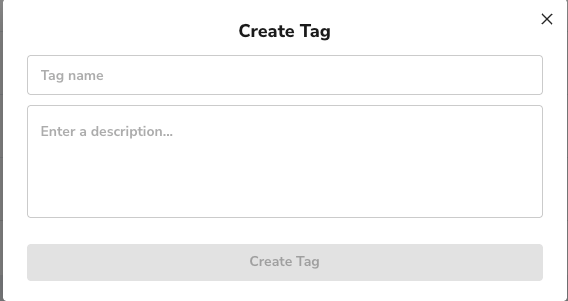
1. Navigate to the **Tags** tab in the Data Sources section.
2. Click **+ Create Tag**.
3. Enter a **Tag name** (e.g., "B82XX") and an optional description.
4. Click **Create Tag**.
 ## Managing Tags
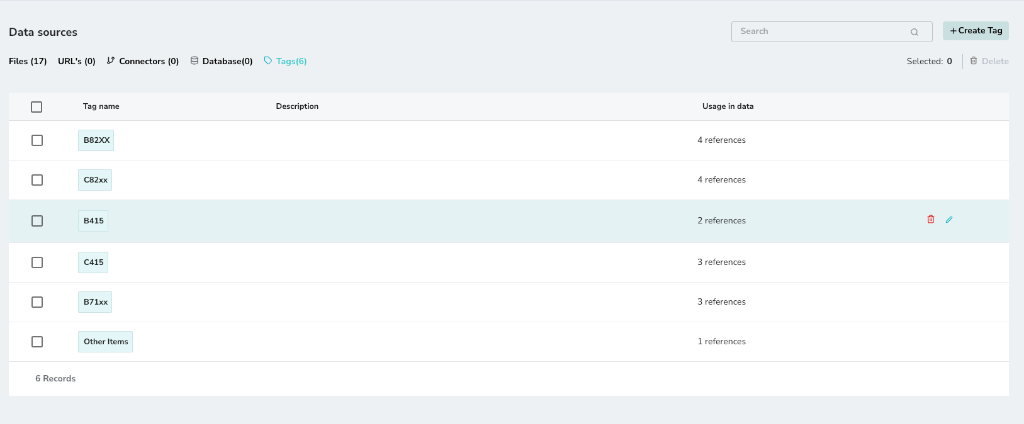
The main **Tags** list shows all your created tags, their descriptions, and how many data items are referencing them. You can edit or delete tags from this view.
## Managing Tags
The main **Tags** list shows all your created tags, their descriptions, and how many data items are referencing them. You can edit or delete tags from this view.
 ## Assigning Tags to Data
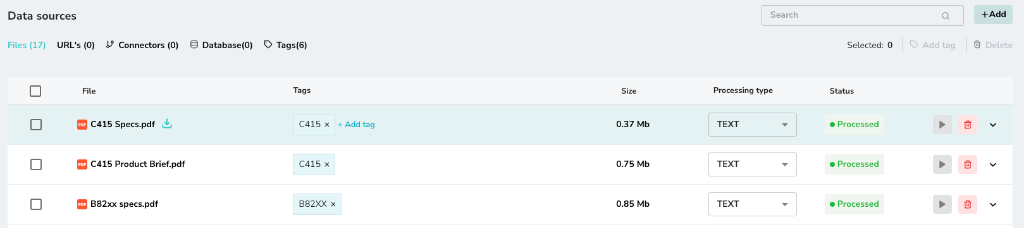
You can assign tags to files, URLs, or other data sources directly from their respective lists.
1. In your **Files** or **URLs** list, locate the item you want to tag.
2. Click the **Tags** column/button for that item.
3. Select the relevant tag (e.g., "C415") to assign it.
## Assigning Tags to Data
You can assign tags to files, URLs, or other data sources directly from their respective lists.
1. In your **Files** or **URLs** list, locate the item you want to tag.
2. Click the **Tags** column/button for that item.
3. Select the relevant tag (e.g., "C415") to assign it.