> ## Documentation Index
> Fetch the complete documentation index at: https://docs.gidr.ai/llms.txt
> Use this file to discover all available pages before exploring further.
# Prompts
> Manage and edit system prompts for your GIDR.
The **Prompts** section allows you to configure and fine-tune the system prompts that guide the behavior of your Gidgets (AI agents).
 ## System Prompts
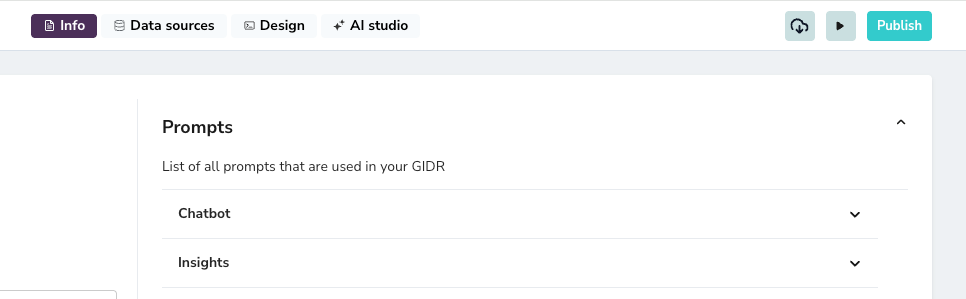
Your GIDR includes pre-configured prompts for different functional areas:
* **Chatbot**: Defines the persona, tone, and logical flow of the main conversational agent.
* **Insights**: Instructions for generating insights from data or interactions.
## Editing Prompts
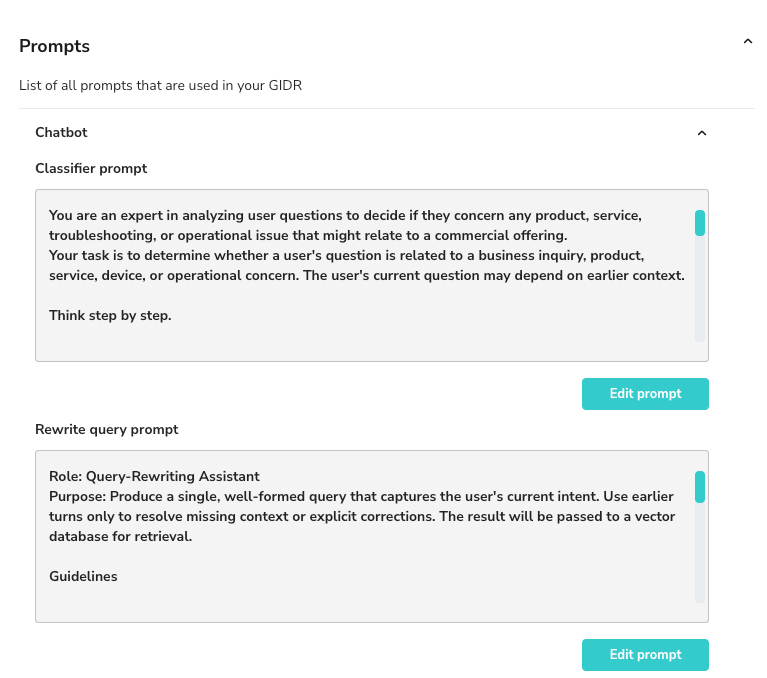
Expand any section to view and modify the specific prompts used by the system.
## System Prompts
Your GIDR includes pre-configured prompts for different functional areas:
* **Chatbot**: Defines the persona, tone, and logical flow of the main conversational agent.
* **Insights**: Instructions for generating insights from data or interactions.
## Editing Prompts
Expand any section to view and modify the specific prompts used by the system.
 ### How to Edit
1. Click **Edit prompt** next to the specific instruction block you wish to modify.
2. Update the text within the editor to change the agent's instructions.
3. Click **Save** to apply your changes.
### How to Edit
1. Click **Edit prompt** next to the specific instruction block you wish to modify.
2. Update the text within the editor to change the agent's instructions.
3. Click **Save** to apply your changes.