> ## Documentation Index
> Fetch the complete documentation index at: https://docs.gidr.ai/llms.txt
> Use this file to discover all available pages before exploring further.
# API Keys
> Manage API keys for programmatic access to GIDR.
Generate and manage **API Keys** to authenticate your applications and scripts with the GIDR platform.
## Managing API Keys
To create and manage your API keys, navigate to the **API Keys** tab in Organization Settings.
### Creating a New API Key
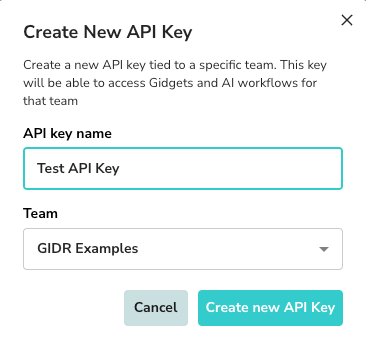
1. Click **+ Add API Key**.
2. **API key name**: Enter a descriptive name for the key.
3. **Team**: Select the team this key will be associated with.
4. Click **Create new API Key**.
 ### Success and Security
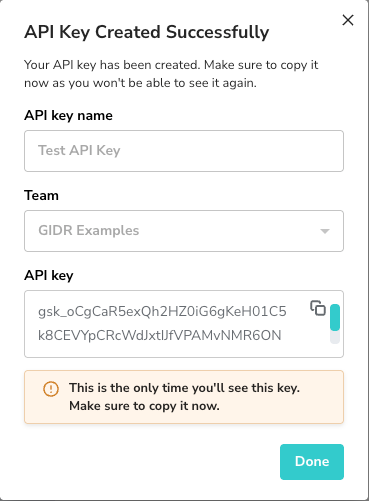
Once created, the API key will be displayed **only once**.
> \[!WARNING]
> Copy the key immediately and store it securely. You will not be able to see the full key again.
### Success and Security
Once created, the API key will be displayed **only once**.
> \[!WARNING]
> Copy the key immediately and store it securely. You will not be able to see the full key again.
 ### API Key List
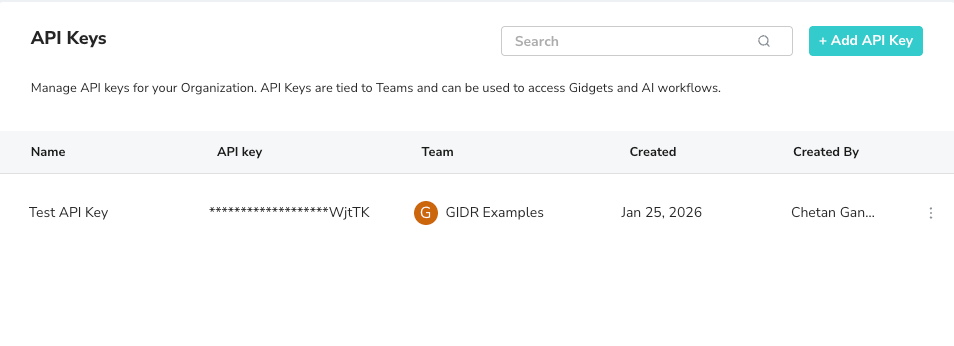
You can view all active keys, their associated teams, and creation details in the list view. To revoke or remove a key, use the menu options next to the key entry.
### API Key List
You can view all active keys, their associated teams, and creation details in the list view. To revoke or remove a key, use the menu options next to the key entry.
 ***
***