> ## Documentation Index
> Fetch the complete documentation index at: https://docs.gidr.ai/llms.txt
> Use this file to discover all available pages before exploring further.
# APIキー
> GIDRへのプログラムアクセスのためのAPIキーを管理します。
GIDRプラットフォームでアプリケーションやスクリプトを認証するための **APIキー** を生成および管理します。
## APIキーの管理
APIキーを作成および管理するには、組織設定の **APIキー** タブに移動します。
### 新しいAPIキーの作成
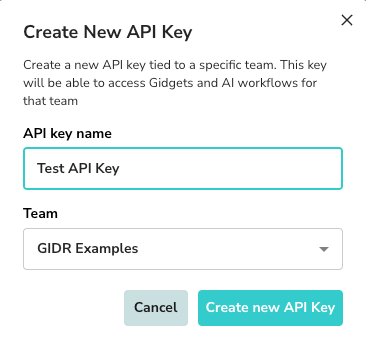
1. **+ APIキーを追加** をクリックします。
2. **APIキー名**: キーのわかりやすい名前を入力します。
3. **チーム**: このキーを関連付けるチームを選択します。
4. **新しいAPIキーを作成** をクリックします。
 ### 成功とセキュリティ
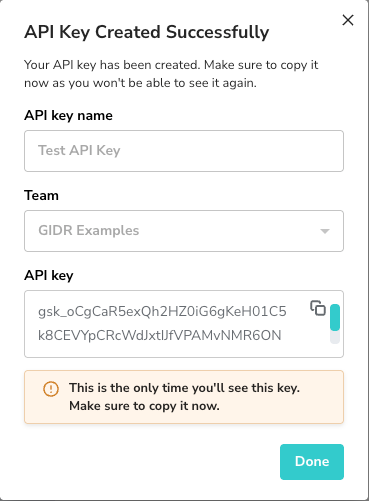
作成されると、APIキーは **一度だけ** 表示されます。
> \[!WARNING]
> キーはすぐにコピーして安全に保管してください。完全なキーを再度確認することはできません。
### 成功とセキュリティ
作成されると、APIキーは **一度だけ** 表示されます。
> \[!WARNING]
> キーはすぐにコピーして安全に保管してください。完全なキーを再度確認することはできません。
 ### APIキーリスト
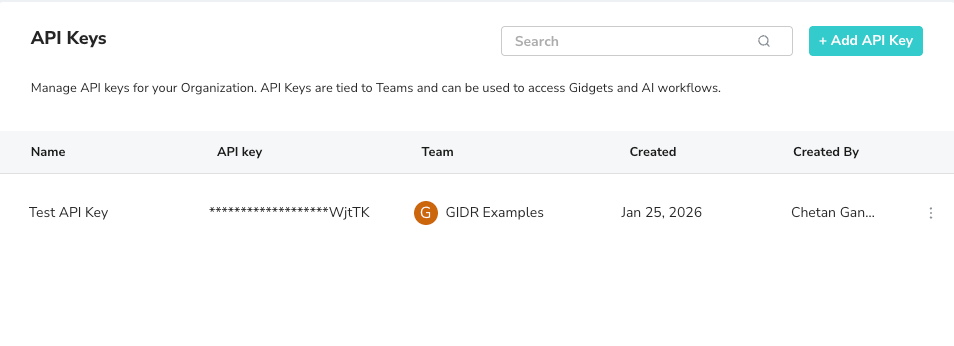
リストビューですべてのアクティブなキー、関連付けられたチーム、および作成の詳細を表示できます。キーを取り消しまたは削除するには、キーエントリの横にあるメニューオプションを使用します。
### APIキーリスト
リストビューですべてのアクティブなキー、関連付けられたチーム、および作成の詳細を表示できます。キーを取り消しまたは削除するには、キーエントリの横にあるメニューオプションを使用します。
 ***
***